
Mojo DISP is the Security Management System for DISP members — your register, your people, your facilities and your evidence, kept current and audit-ready inside your own Microsoft 365.
Built in Canberra by the team that delivered the first OFFICIAL and PROTECTED Microsoft 365 environments in the Australian Federal Government.
Book a 25-minute demo and we'll walk you through Mojo DISP — a Security Management System built for DISP members.
Book a 25-minute demoPeople, clearances, briefings, travel, facilities, containers, keys, combinations, assets, incidents, training, contracts — and the checks, declarations and evidence that keep them true. Updated once.
Runs on the Microsoft 365 you already pay for. Reminders and escalations arrive in Teams and Outlook, where your people already are. Your tenant, your data, your security boundary. Nothing leaves.
Key musters, container checks, annual declarations, clearance revalidations — scheduled once, opened on their dates, chased in Teams and Outlook, closed when done.
We walk how your security is managed today — wherever it lives — and name the gaps out loud.
Into your Microsoft 365. No new infrastructure, no new vendor to onboard.
Register live, officers appointed, your people declaring for themselves.
Your next twelve months of DISP activity is on its dates, and your Security Governance register exports into Defence's own workbook whenever you need it.
You were assessed once. Since then you've hired people, lost people, moved a safe, changed a combination, sent someone overseas, had a near miss, and renewed a contract. Every one of those is a change to your register, and your register is the thing Defence looks at.
Most members are running it out of a spreadsheet, a shared drive and one person's memory. That works right up until it doesn't — and it stops working on exactly the day somebody asks you to prove it.
The register says where you got to. The system is everything that gets you there and keeps you there: who is appointed and to what, what gets checked and how often, who was asked, what they answered, who never answered at all, what changed, who changed it, and what stands behind every one of those claims.
A spreadsheet can hold the first. It cannot be the second, and the second is what you're being assessed on.
mandated register sections you're expected to keep current
Security Officer, in most member companies, running the whole system
audit trail, if your register lives in a spreadsheet
The question isn't whether your register is accurate. It's whether you could demonstrate it was accurate last March.
| Spreadsheets & SharePoint | Generic GRC platform | Mojo DISP | |
|---|---|---|---|
| What it is | A record of where you got to | A controls library you map yourself | A Security Management System, built for DISP |
| Register structure | Whatever you built | Generic controls, mapped by you | Built to the DISP Member Security Register, section by section |
| Producing the register for Defence | Rebuilt by hand each time | Exported to a format you then reformat | Fills Defence's own issued workbook, on demand |
| Where the data lives | Wherever the file was saved | Vendor's cloud | Your Microsoft 365 tenant |
| Who changed what | Last-modified-by, if you're lucky | Vendor's log | Tamper-evident, hash-chained audit trail |
| Getting declarations back | Email, then chasing | Email, then chasing | Automated rounds, reminders and escalation on timeframes you set |
| Where the reminder lands | An email you wrote | The vendor's portal | Teams and Outlook, automatically |
| Your own processes and forms | A new tab | A generic template | A visual designer, with Defence-structured baselines included |
| Keeping it current | Somebody remembers | Somebody remembers | The system asks, chases, escalates and records |
| Licensing | Free, until it costs you a finding | Per user, per month | Contact us for pricing |
| Separation of duties | Honour system | Configurable, usually off | Enforced server-side, on by default |
Talk to our team about your DISP membership level, headcount and requirements.
Mojo DISP is a Power Platform application, so your Security Management System runs inside your own Microsoft 365. Your register, your people's details, your incident reports and your evidence sit in your Dataverse, under your tenant's identity, your conditional access and your retention policy.
There is no Mojo Up cloud. There is no copy of your register on our infrastructure. When your assessor asks where the data is, the answer is the same answer you already gave them about your email.
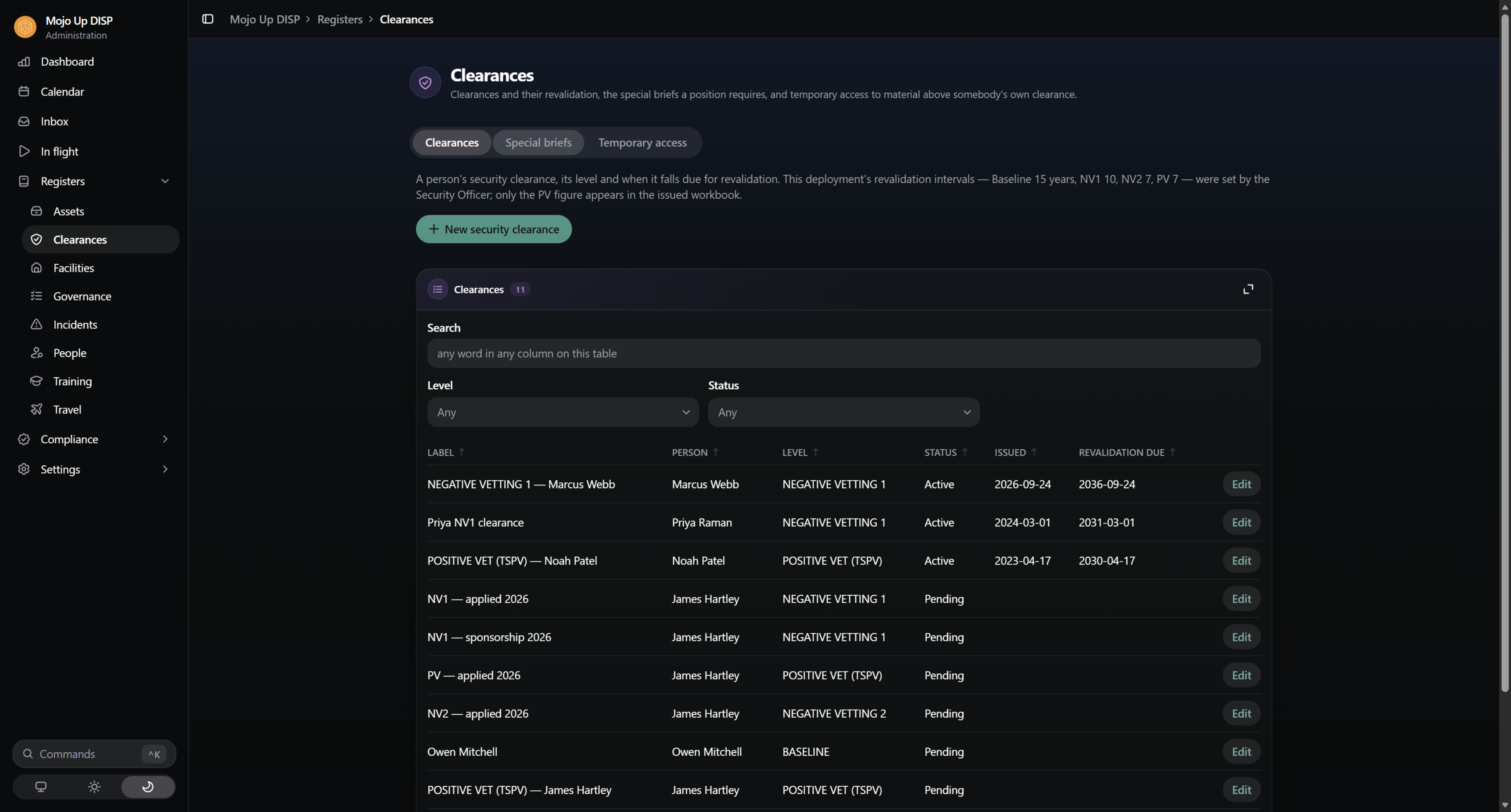
Seven things. Mojo DISP is built as those seven rather than as a feature list, which is why the parts fit together instead of sitting beside each other: record it, report it, run it, design how it runs, involve your people, evidence it, and control who may do what.
Twenty-five sections, structured the way the Member Security Register is structured — governance, personnel, physical security, ICT. A person is one record, referenced from every section they appear in, so a promotion, a clearance renewal or a departure is one edit rather than six.
A section that doesn't apply to you isn't hidden — it's recorded as not applicable, with who decided that and why. That's the difference between a register with a gap in it and a register with an answer in it.
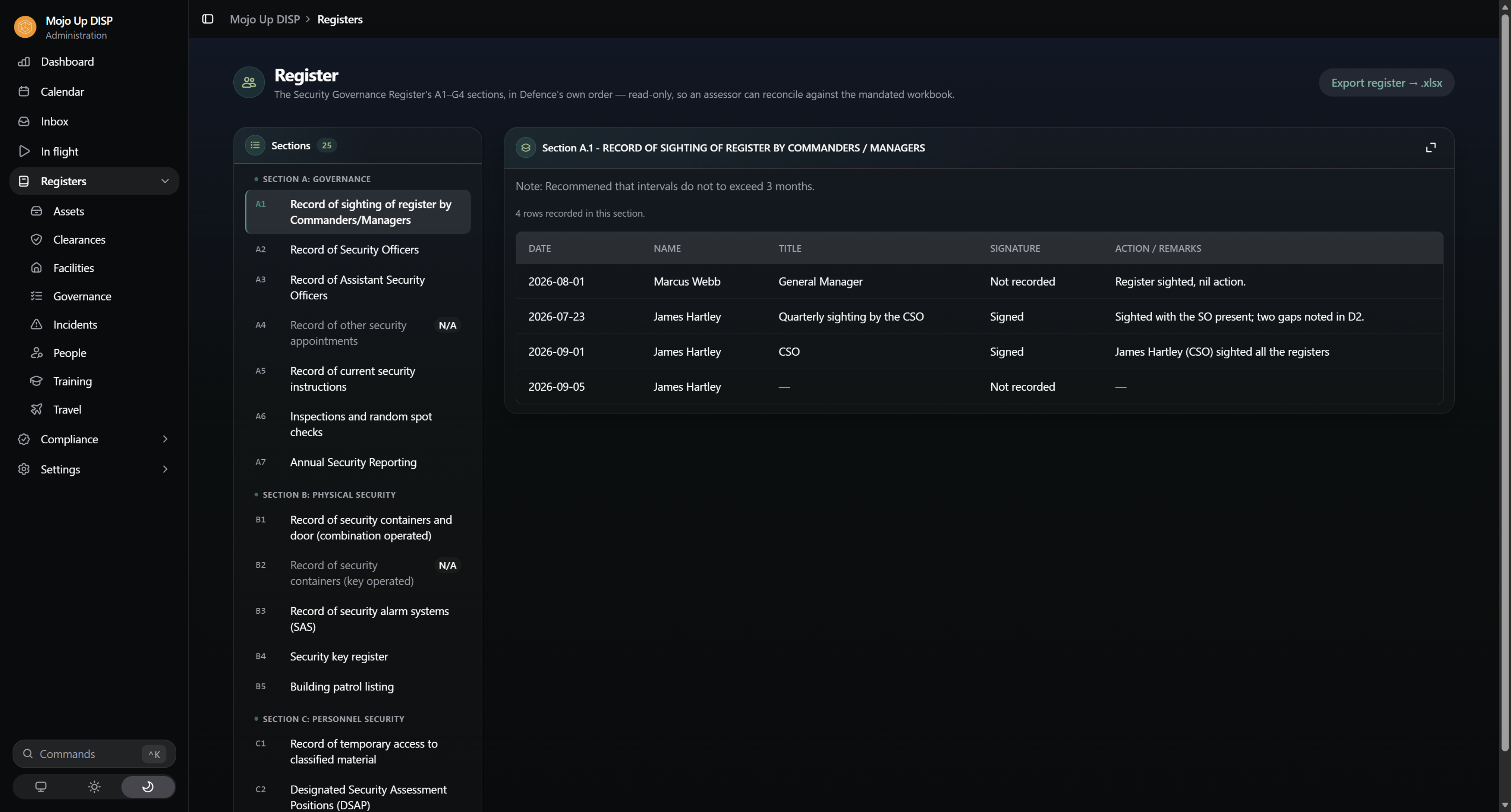
Whenever you need it — an assessment, an annual return, an assessor's request — one click writes your Security Governance register into the issued workbook: the real one, with its columns, its headings and its protective marking band intact. Every export is recorded: who ran it, when, and what was in it.
An export that can't be completed doesn't hand you a half-filled spreadsheet. It stops and tells you what's missing, because a compliance document with rows silently dropped is worse than no document at all.
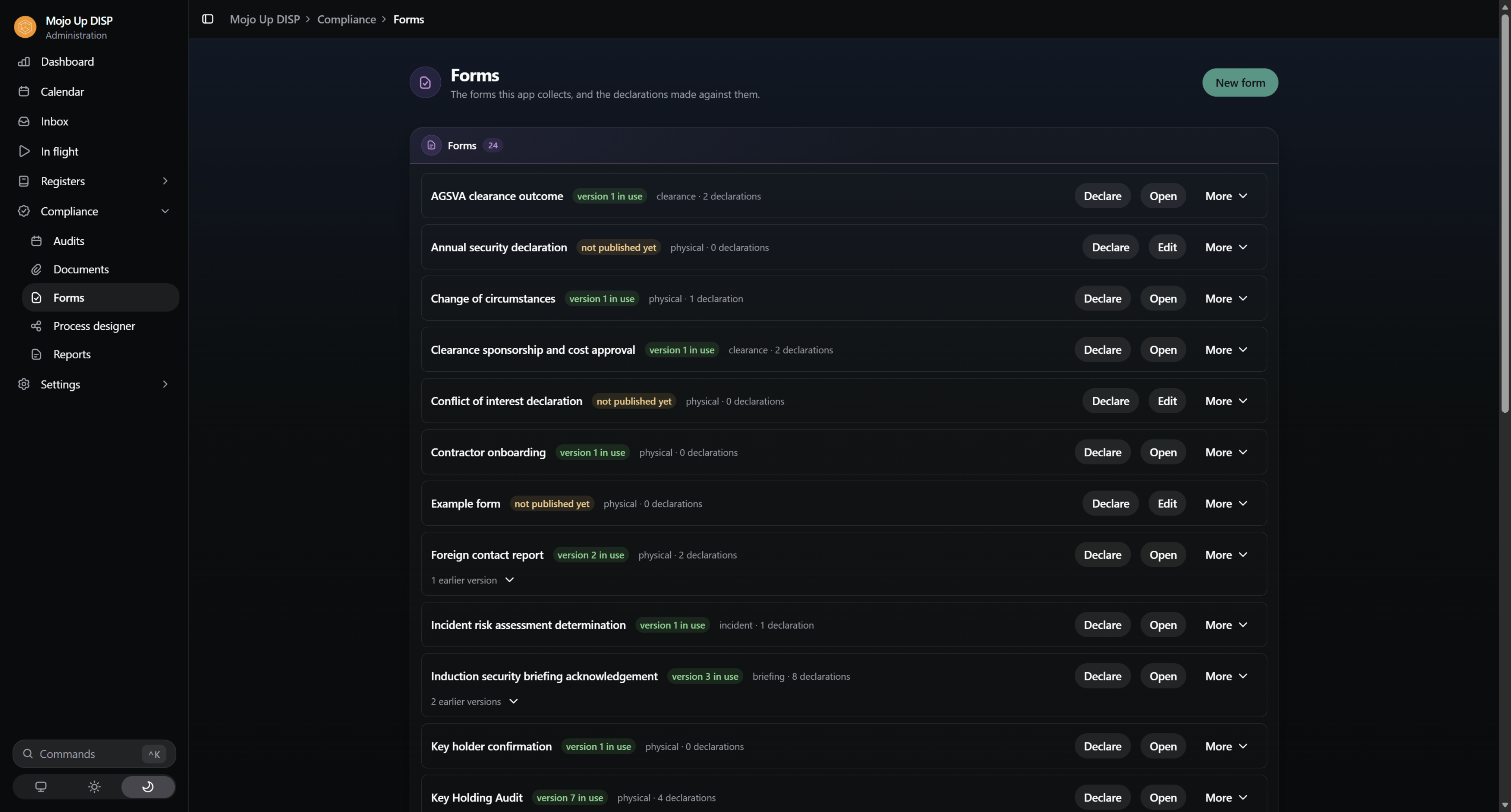
This is the half a register can't do. Program the year — key musters, container inspections, annual declarations, clearance revalidations — and Mojo DISP opens each round on its date, asks the people it needs to ask, reminds the ones who haven't answered, escalates to the security team when they still haven't, and closes when it's done.
The timeframes are yours: every reminder, due date and escalation runs on an SLA you set once and change in one place. And nobody has to open a new system to be reminded — the nudge arrives as a Teams notification and an Outlook email, from the system, with a link straight to the thing being asked for.
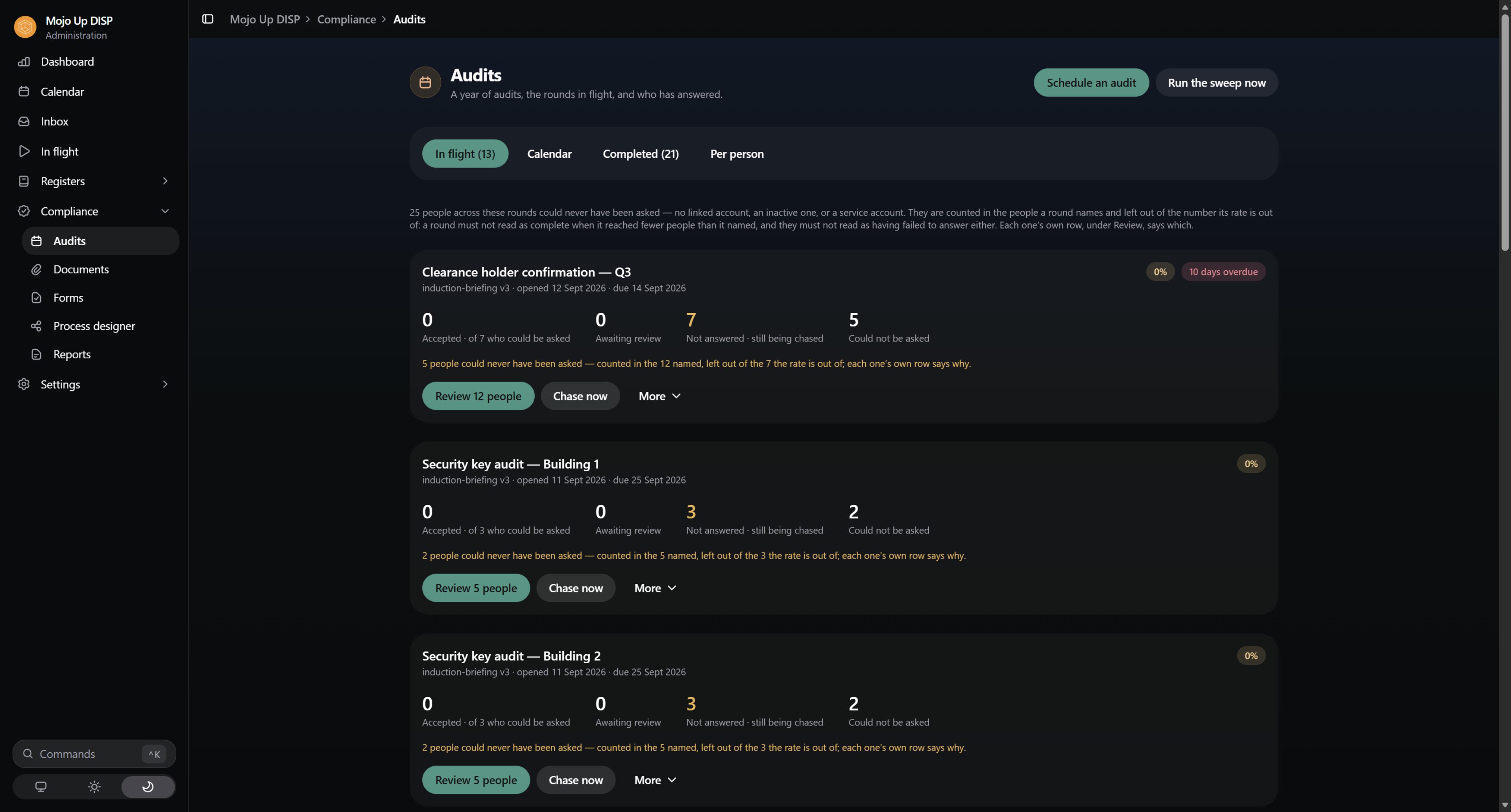
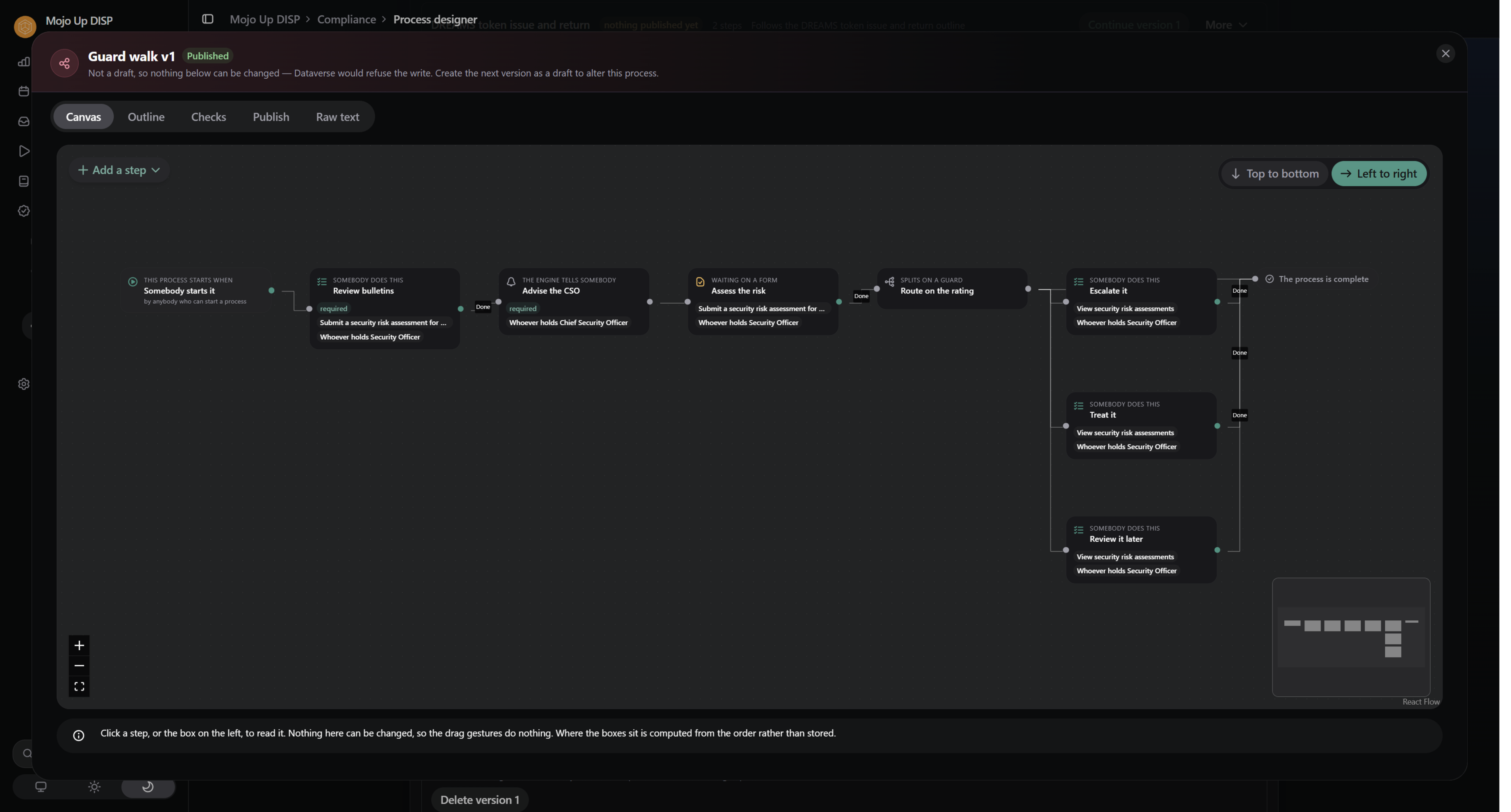
Every DISP process in Mojo DISP — an incident, a clearance sponsorship, an overseas travel briefing and debrief, a combination change — runs on a workflow, and every declaration runs on a form. Both are yours to design, in a visual designer, with no code.
You don't start from a blank page. Mojo DISP ships with baseline processes and forms built from the Member Security Register and Defence's own workbook, and each baseline carries a locked spine: the steps a process must have for the register to stay true and the obligation to Defence to be discharged. You can add, reorder and branch around them. You can't remove them by accident.
A process is drafted by one person and published by another, and a published version is immutable — so a declaration made against it years from now is readable against the exact questions that were on screen. Changing the questions is a new version, deliberately.
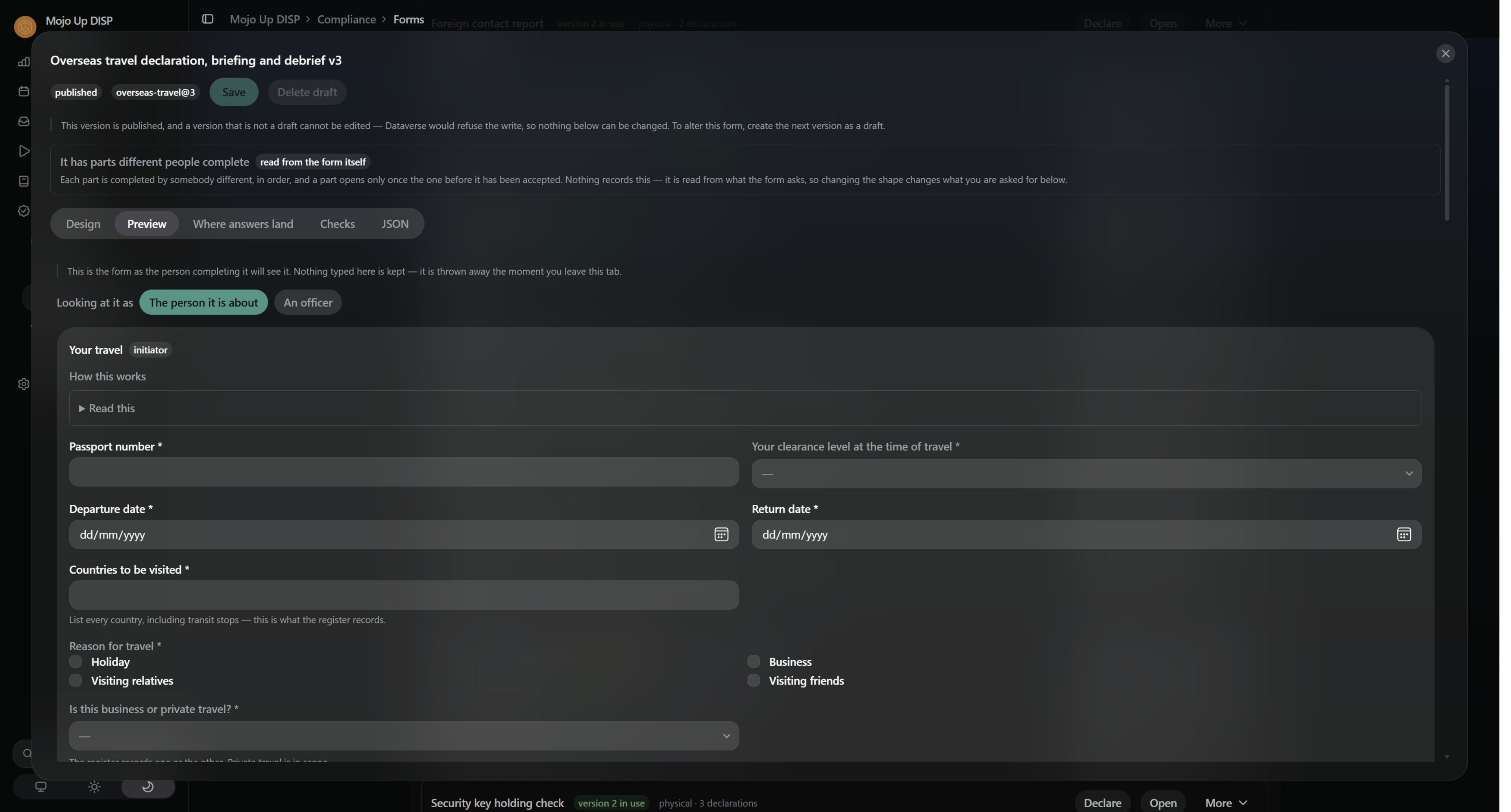
A Security Management System that only your Security Officer touches is one person's memory with a licence fee. Everyone in your company gets their own view — not your register, just the parts that are about them. They confirm the keys they hold, declare overseas travel, acknowledge a briefing, report an incident, and attach the signed document where one is needed.
They can see what they're being asked and nothing else. Not your assessment of them, not anybody else's clearance, not the register. That containment isn't a hidden screen — it's enforced in the platform, underneath the app.
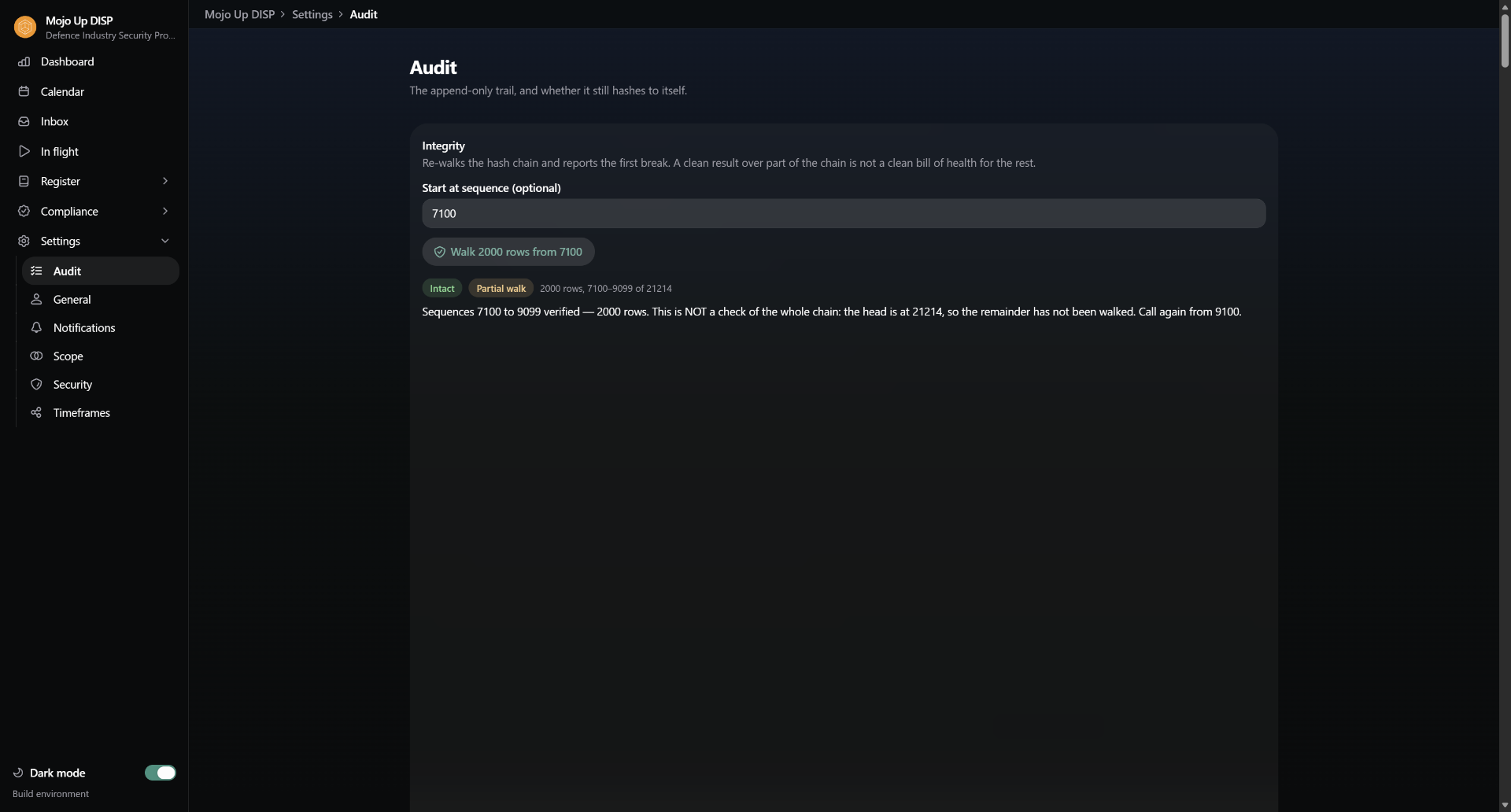
Every create, update and deletion is written server-side, by the platform, not by the app — with the person, the moment, the record, the permission it relied on, and what actually changed. Each entry is cryptographically linked to the one before it, so the trail can be verified end to end and an altered entry can't hide.
Nobody edits it. Not an administrator, not us, not you. A mistake is corrected by a new entry that supersedes the old one, which is exactly what an assessor wants to see.
Refusals are recorded too. "Has anyone tried to do something they weren't allowed to do?" has an answer, and the answer isn't silence.
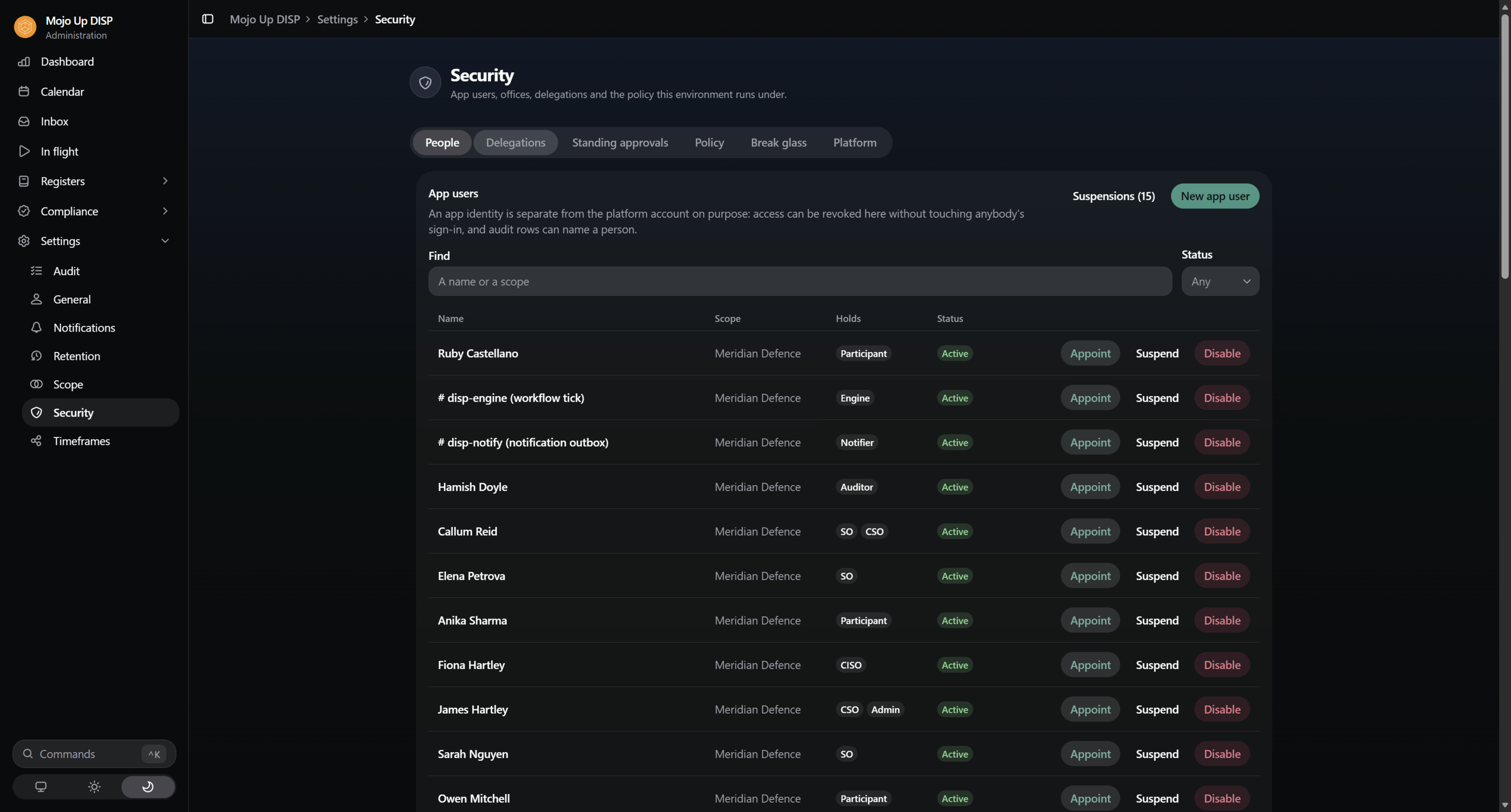
CSO, CISO, Security Officer, Auditor, and everyone else. Each holds named permissions, and the app doesn't decide what you may do — the platform does, on every write, whether the request came from the app or from anywhere else.
Separation of duties is real: the person who drafts a process isn't the person who approves it, and where your company genuinely only has one officer, the exception is recorded as an exception rather than quietly permitted.
Delegation is time-bound and can never escalate. And when something has to be done outside the rules, break glass opens a reviewed window with a justification attached — not a switch somebody leaves on.
Signed declarations, correspondence with Defence, briefing records, certificates. Every file is fingerprinted when it arrives and checked again every time it's read, so "this is the document we filed" is something you can demonstrate rather than assert.
Disposal is a two-step act with a reason on it, and the record of the file outlives the file.
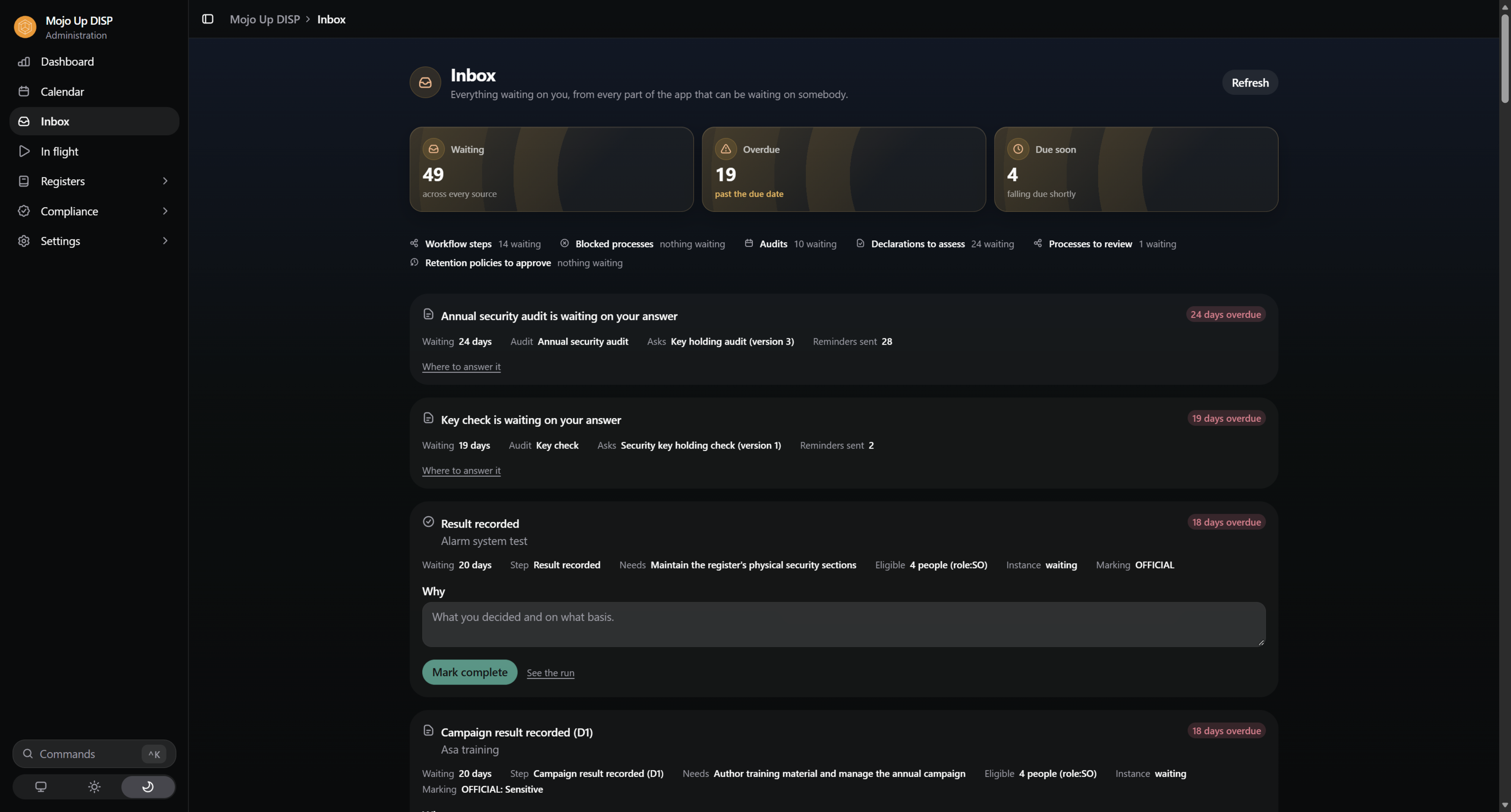
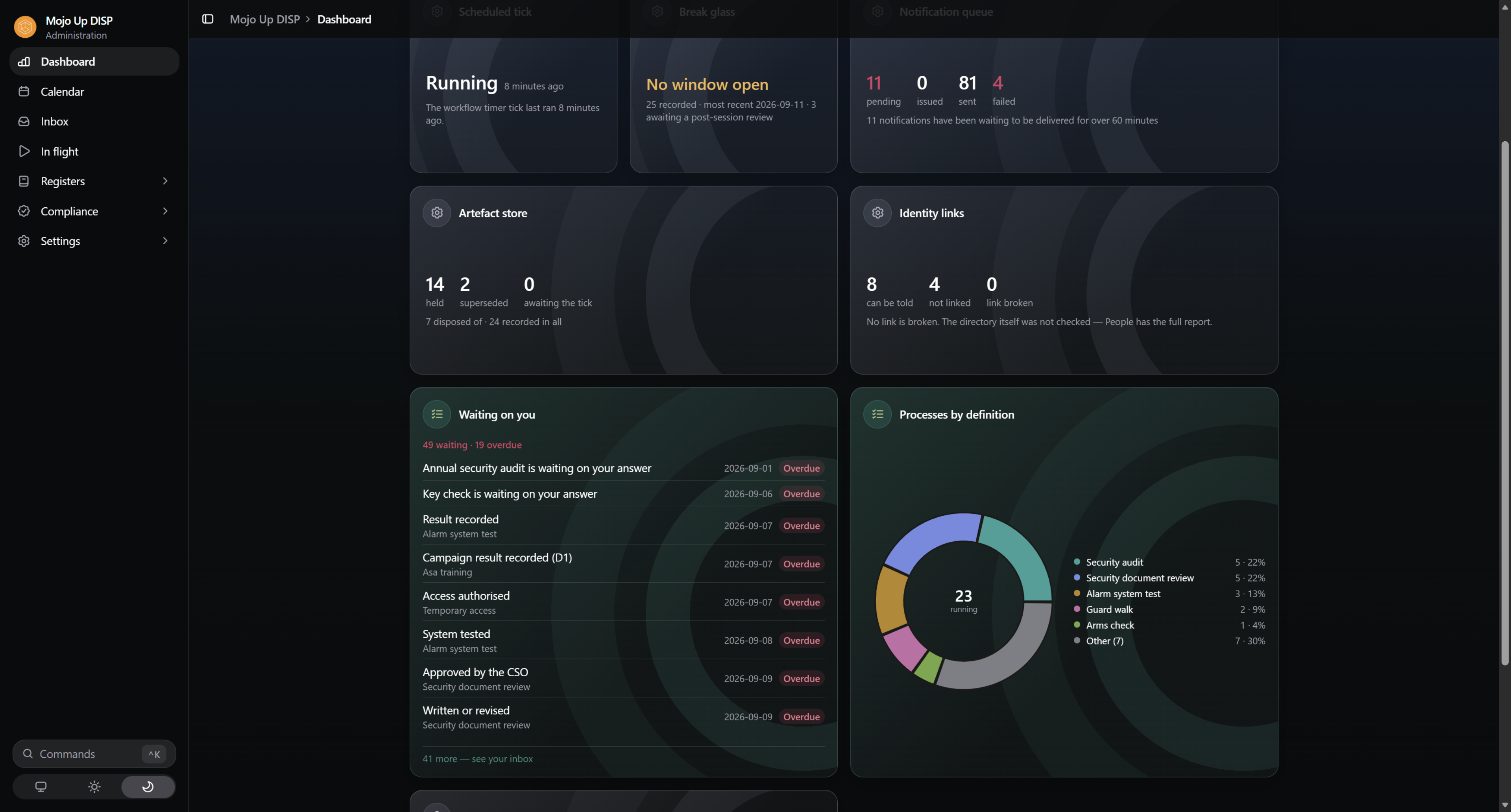
The dashboard leads with what is falling due — clearances to revalidate, containers overdue for a combination change, briefings owed before travel, rounds still waiting on people — drawn from the register itself, not from a spreadsheet somebody keeps beside it. Every officer arranges their own; an Auditor sees the compliance picture and never a name.
When you need it on paper, compose your own report from the same figures — a page for the board, a page for your assessor — and print it with the protective marking on it. The register export is Defence's workbook; this is yours.
And when. Derived from the register, so it can never disagree with it.
From forty-plus widgets, saved per person. An Auditor's view carries figures and no names.
With your marking band. Recorded when exported, like every other export.
On screen, live, in Defence's own structure — not a file somebody has to go and find.
Every record carries its last sighting and what's falling due. The dashboard leads with what's overdue.
Named, timestamped, reason attached, cryptographically chained. Including the changes that were refused.
Declarations, with who was asked, who answered, who was excused, and who could never be reached.
The permission model is the answer, and it's enforced beneath the app rather than in it.
Your assessor will ask about the tool as well as the register. Mojo DISP is developed against the Information Security Manual's guidelines for software development, and we keep the evidence rather than the assertion: which controls are implemented, how each one is evidenced, and which are recorded as gaps with a plan against them.
An ISM compliance report for the app is available to customers and prospective customers, so your assessor can verify it rather than take our word for it.
Your register, your declarations, and Defence's workbook whenever it's asked for. Set up in a day, and the system does the chasing so your Security Officer can go back to their actual job.
Separation of duties, delegation while people are on leave, scheduled audit rounds across multiple sites, and evidence attached to every claim.
Physical security registers, key and combination management, weapons and munitions, classified waste, visitor control — and one dashboard across all of it.
The whole of how your company's security is run and evidenced — not just the register. Who is appointed and to what. What gets checked, how often, and by whom. How your people are told things and how you know they were told. What changed, who changed it, and what stands behind it. Mojo DISP is that system in one place, with the DISP Member Security Register as the record it keeps.
No. Mojo DISP is a Mojo Up product, built to help members meet their own DISP obligations. Your membership, your assessment and your relationship with Defence remain yours.
In your own Microsoft 365 tenant, in your Dataverse environment, in the Australian region you choose. Mojo Up holds no copy.
No. Your policies say what your company will do; the Security Management System is where you run it, keep the register, hold the evidence and show that those policies are actually being followed.
Because a generic controls library isn't the Member Security Register, and mapping one to the other is a project you have to redo every time either one changes. A GRC platform tells you which controls exist. This runs the program.
Deployed in a day. Migrated and live inside a month, depending on the state of your current register.
Talk to us on the call — participant access is licensed differently from officer access, and it depends on your tenant.
The ceiling is a setting, up to PROTECTED, and it's yours to choose. What the platform underneath is accredited to hold is a matter for your own environment and your own assessor — we'll tell you plainly what is and isn't ours to certify.
It is built against the ISM's guidelines for software development, and we publish the position control by control — implemented with evidence, not applicable with a reason, or a recorded gap with a plan. Ask for the ISM compliance report and we'll send the current one. It is our statement about our software; your environment's accreditation remains yours and your assessor's.
Yes — that's the point of the designer. Baselines ship structured to the register and Defence's workbook, with the steps that can't be dropped locked in. Everything around them is yours to shape, and a published version is never edited in place, so what somebody declared against stays readable.
It was never anywhere else. It's in your tenant, in your tables, and it stays there.
Yes — into Defence's own workbook, into Excel, and into a report you compose yourself.
A 25-minute walkthrough of the Security Management System, or a conversation about how Mojo DISP fits your membership level. No slide deck.
Or email contactus@mojoup.com.au.